

Free Online Converter to Sheet Music: A Step-by-Step Guide
A practical workflow for converting a piano recording, melody, MIDI file or full song into readable sheet music in your browser.
From recording to notation you can read, play and print. Choose the source before you convert
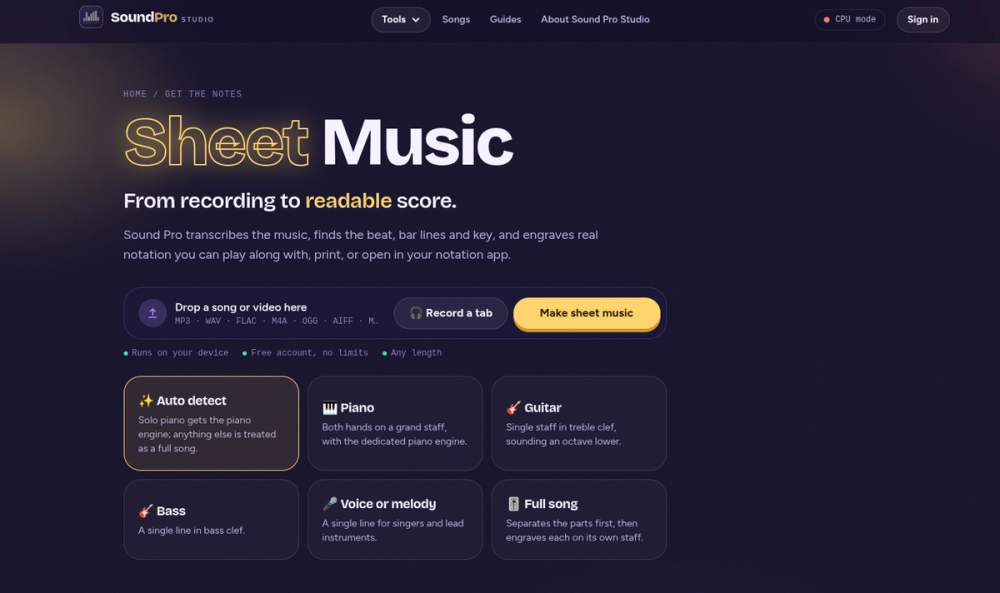
The best conversion workflow depends on what you have. A MIDI file already contains pitches and timing, so it is the fastest route to notation. A solo piano recording needs polyphonic transcription because several notes and pedal resonance overlap. A sung or played melody needs monophonic transcription. A complete song usually needs stem separation before any one part can become useful notation.
Match the source to the correct mode instead of choosing the most complicated option. A clean melody processed as a full song adds unnecessary separation work, while a band mix processed as one instrument asks the transcriber to explain too many sounds at once.
Step-by-step conversion workflow First, open Sheet Music and add the recording or MIDI file. Second, select Piano, One instrument or voice, or Full song. Third, let the browser analyse the notes, beat, measure boundaries and key. The first run can take longer because the transcription model must be downloaded to the device.
Fourth, listen to the score playback while watching the cursor. Correct the key signature or time signature if the notation does not match what you hear. For piano, move the hand-split point until the two staves look natural. Finally, export PDF for printing or MusicXML for detailed editing in a notation application.
Make the result easier to read Readable sheet music is not the same as a frame-by-frame record of every timing variation. Quantization groups nearly simultaneous notes, turns short gaps into rests and represents sustained sound with note values and ties. Start with a moderate rhythmic resolution; overly fine quantization can fill the page with tiny rests and tied notes.
Check the large-scale structure before polishing individual pitches. Confirm the pickup measure, downbeats, repeat points and phrase lengths. Once the measures are right, isolated wrong notes are much faster to find and correct.
When to use a human transcriber Automatic conversion is strongest on clear piano, isolated instruments and distinct melodies. A human arranger is still valuable for orchestral reductions, jazz voicings, multiple independent voices and publication-ready engraving. Those tasks involve interpretation, not only detection.
A useful approach is to let the converter create the first draft and then hand the MusicXML to a musician for cleanup. That keeps the process fast while preserving human judgment where it matters.


